


VIN Decoder & Vin check
4.763.00 Reviews
App Specs
- Version
- 1.2.5
- Updated On
- License
- Free
- Downloads
- 100,000+
- Developer
- Vin Check
- Categories
- Auto & Vehicles
- Platform
- Android
Screenshots


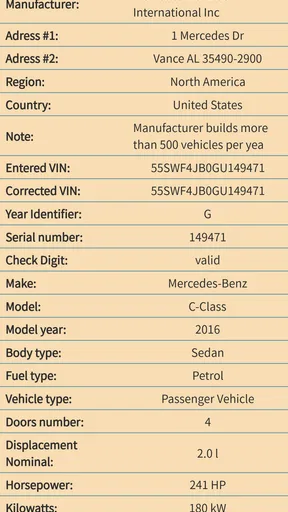
 Analysis by AppCompare
Before I rely on a vehicle history report, I want to know whether I have the right VIN and what that identifier can tell me. That simple first step is where VIN Decoder & Vin check is most useful: it gives you a way to scan or enter a vehicle identification number and check what comes back. I see it as a practical starting point for a car search, not a substitute for inspecting the vehicle or verifying important claims with other sources.
A quick check starts with the VIN itself
A VIN is a vehicle’s identifying code, and a small transcription error can make a lookup unhelpful. The app’s scanner and VIN recognition offer an alternative to typing all the characters by hand, which is handy when you’re standing beside a car and the number is awkward to copy. I’d still compare the captured VIN with the number on the vehicle and the paperwork before treating a result as relevant.
That extra check is easy to overlook when you’re in a hurry. If the scan is unclear, glare or a cramped viewing angle can make manual entry the better option. I’d enter the code carefully, then check it character by character against the vehicle. This modest habit helps separate a genuinely unhelpful lookup from a simple input mistake.
What a decoder can—and cannot—settle
A VIN check is useful for connecting an identifier with vehicle information, but a decoded result should not be treated as a complete verdict on a car. It can help you make sense of the code and decide what to investigate next; it cannot, by itself, prove that a seller’s description is accurate or that a used vehicle is mechanically sound. I would use a decoder to prepare better questions, not to skip an inspection or a test drive.
That distinction matters most when money is involved. A result that looks reassuring is not the same as a professional examination, and a mismatch deserves attention rather than a quick explanation. If a listing gives a different model detail from the lookup, I’d pause and compare the VIN on the car, the registration documents, and the seller’s description before moving forward.
Useful at the viewing, not just at home
Picture arriving to see a used car after work. The seller is waiting, daylight is fading, and you have only a few minutes before deciding whether the vehicle is worth a closer look. A VIN scanner can make that first check less fiddly than copying a long code into a search box. I’d scan the number, confirm the characters, and use the result to guide a calm conversation rather than treating a quick lookup as permission to buy.
The app may also suit owners who want to keep a VIN handy when arranging maintenance or discussing a vehicle with a buyer. In either case, the benefit is convenience: the identifier is easier to check when you need it. For a one-off purchase, though, I’d compare the result with a mechanic’s inspection and relevant paperwork, since those answer different questions.
Worth Reading Before You Choose

EA SPORTS FC Mobile 26 Is a Bigger Football Game, but It Takes Time

Flipboard Shows What News Apps Must Do Beyond the Feed

Switching to Android Auto Means Rethinking Your Driving Routine

Google Calendar Makes a Crowded Week Easier to Manage

Ludo King Makes the Most of the Minutes Between Plans

Baby Panda World Brings Quick Play to Modern Phones, but Its Game Library Feels Busy
Choosing between an app and other checks
Compared with decoding a VIN manually, a scanner can save effort and reduce the chance of mistyping the code. Compared with a paid vehicle-history report, a decoder is a more focused first step: it helps you examine the identifier, while a broader report or an in-person inspection may be more appropriate when you need evidence for a purchase decision. I wouldn’t assume that every lookup provides the same depth or coverage, so I’d check what a particular result actually includes before paying for more.
That’s also why I wouldn’t buy a report simply because a car looks promising. First confirm the VIN and see whether the information returned is useful for your question. If you are comparing several cars, keeping your notes beside each VIN can prevent details from getting mixed up. A scan is quick; careful comparison is what makes it useful.
There are situations where this app is not the right tool. If you already have a trusted mechanic examining the vehicle, or you need a formal source for a legal or insurance matter, a decoder should not replace the relevant professional or official channel. Likewise, if the VIN is damaged or unreadable, scanning cannot solve the underlying problem; ask the seller for a clear view and check the documentation instead.
Who is likely to get the most from it
I’d recommend the app most to used-car shoppers who want a convenient way to check a VIN before deciding whether to spend more time on a listing. It can also help an owner who has never decoded a VIN understand the vehicle identifier without starting with a manual chart. People who regularly assess vehicles may appreciate the scanner as a quick first step, but they should still use the records, inspections, and other checks their work requires.
If you only need to decode one VIN, the free app may be enough to try. It is listed as free, with in-app purchases ranging from $3.99 to $38.99 per item, so I’d inspect the available purchase details before committing to anything. The app is in the Auto & Vehicles category, is made by Vin Check, and has a 4.5 average from around 1.1 thousand ratings. Those figures suggest plenty of people have tried it, but they don’t tell me whether a particular vehicle lookup will answer every question.
Unlocking the Mysteries of Your Vehicle
First off, what's a VIN? It's like the DNA of your car. Every vehicle has a unique Vehicle Identification Number (VIN) that tells you everything from where it was made to the type of engine it purrs with. But here’s the kicker—deciphering this info isn’t exactly straightforward. Enter the VIN Decoder & Vin check app.
Getting Started
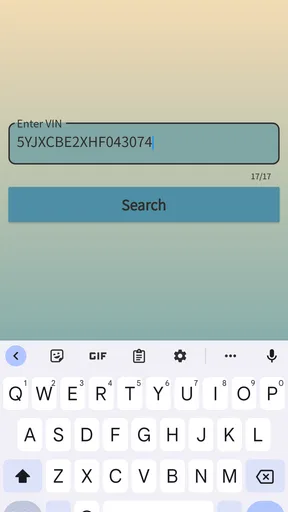
Once you download and install the app, the user-friendly interface greets you with a straightforward search bar to enter the VIN. You don’t need to be a tech whiz to navigate through this app, which is a huge plus in my book. Just type in the VIN, hit search, and let the app do its magic.
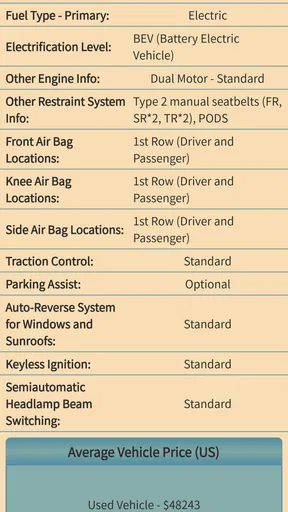
What’s cool is the app’s ability to pull up detailed info in seconds. We’re talking about the make, model, year, engine type, and even the manufacturing plant. It’s like peeling back the layers of your vehicle’s identity! I was honestly surprised by how much data was retrieved with just a few taps.
Features that Stand Out
One of the standout features is the historical data. The app not only shows you the basics but also delves into service records, accident reports, and even recalls. Knowing the service history can be a goldmine, especially if you’re buying a used car. It’s like having a private detective for your vehicle.
The recall alerts are another lifesaver. The app sends you notifications if your vehicle has any recalls you might’ve missed. It’s like having a guardian angel for your ride, keeping it safe and sound.
Why I’m Hooked
Let’s talk about usability. I love how the app doesn’t bombard you with ads or unnecessary features. It focuses on what matters—providing accurate and comprehensive data without the fluff. Plus, it’s available on both Android and iOS, so no one is left in the lurch.
The app also offers a subscription service for those who need more detailed reports regularly. For most users, the free version does the trick, but if you’re a car enthusiast or in the business of buying and selling cars, the premium version might just be your best friend.
A Few Things to Consider
Every app has its quirks, and this one is no exception. While the interface is generally smooth, there were a few moments when the app took a bit longer to load the data. Nothing major, but patience is a virtue, right?
Also, while the app covers a wide range of vehicles, it might occasionally miss out on some international models or older cars. But hey, nobody's perfect.
Final Thoughts
In the world of car apps, the VIN Decoder & Vin check app is a standout. Whether you're a curious car owner or a savvy buyer, this app is a must-have tool in your arsenal. It’s reliable, easy to use, and packed with information that could save you time, money, and headaches down the road.
So, if you’re ready to demystify your vehicle’s past and ensure its future is as smooth as a Sunday drive, give this app a whirl. You might just find it as indispensable as your trusty toolkit.
Practical details before you install
The app is free to download, rated Everyone, and its current version is 1.1.2, with Android support starting at version 5.0. It has passed 100 thousand installs, so it is not an obscure tool, although popularity alone is no guarantee that a specific VIN will return a complete or current picture. I’d treat it as one handy part of a careful check rather than the whole decision.
For the smoothest first use, I’d have the VIN ready before opening the search: photograph the label or document for reference, then scan or type the code and compare it with the source. If you’re checking multiple vehicles, make a separate note for each VIN and its matching listing. That small bit of organization helps avoid attributing one car’s result to another, especially when comparing similar models in quick succession.
Make the result useful for your decision
The key question is not simply whether the app returns information, but whether that information answers what you need to know at that moment. If you’re trying to identify a vehicle or check that a seller’s basic description lines up, a decoder can be a convenient screen. If you’re weighing a costly purchase, use any result as a prompt for follow-up: ask for records, inspect the car in person, and have a qualified mechanic assess its condition.
I’d also be cautious about interpreting a missing detail as proof that something is wrong—or proof that everything is fine. A lookup can only help with the information it returns. When the result is incomplete or conflicts with the paperwork, verify the VIN and seek another appropriate source instead of filling in the gaps with assumptions.
Overall, I like the idea of having a VIN scanner and decoder ready for those moments when a long code would otherwise slow me down. Its strongest role is as a convenient first check: scan, confirm, and use what you learn to decide what deserves closer attention. For a casual owner or a used-car shopper, that can make the initial research more approachable; for a buyer who needs certainty about condition or history, it should sit alongside—not replace—proper records and expert inspection.
Pros
- Easy-to-use interface for quick VIN checks.
- Supports multiple vehicle brands and models.
- Provides detailed vehicle history reports.
- Offers real-time data updates for accuracy.
- Includes a user-friendly mobile app version.
Cons
- Limited free features; most require subscription.
- Occasional delays in retrieving older data.
- Some reports may lack full maintenance history.
- App contains ads that can be distracting.
- Requires stable internet for optimal performance.
FAQs for VIN Decoder & Vin check
What is the primary function of the VIN Decoder & VIN Check app?
The VIN Decoder & VIN Check app is designed to provide users with detailed information about a vehicle by analyzing its Vehicle Identification Number (VIN). This includes information such as the car's make, model, year, engine type, and more. It's a valuable tool for anyone looking to buy a used car or verify vehicle details.
How accurate is the data provided by the VIN Decoder & VIN Check app?
The app sources its information from reputable databases and automotive industry records, ensuring a high level of accuracy. While it strives to provide the most up-to-date and precise data available, users should cross-reference with official documents or consult professionals for critical decisions.
Is the VIN Decoder & VIN Check app free to use?
The app offers a free version with basic VIN decoding features. However, for more comprehensive reports and detailed vehicle histories, there might be in-app purchases or subscription options. It's advisable to check the app store listing for the most current pricing details.
Can I use the VIN Decoder & VIN Check app for vehicles outside the United States?
Yes, the app supports a wide range of international vehicles. While primarily focused on cars sold in North America, it includes data for many models from Europe, Asia, and other regions. However, the depth of available information may vary by country.
What devices are compatible with the VIN Decoder & VIN Check app?
The VIN Decoder & VIN Check app is available for both Android and iOS devices. It requires a modern smartphone or tablet with an updated operating system to ensure optimal performance and access to the latest features. Always check the app's system requirements before downloading.


